


The fastest way to relieve laptop-related neck pain is to raise your screen to eye level and add an external keyboard, then break up static posture every 20 to 30 minutes. Do these three things right now:
- Prop your laptop on a stand, box, or stack of books so the top of the screen sits near eye height.
- Do 6 slow chin tucks, then stand and roll your shoulders for 20 seconds.
- Set a timer to repeat this every half hour.
Stop and check with a doctor if you notice arm numbness, tingling, or new weakness. That’s not something a stretch will fix.
Key Takeaways
Fixing laptop neck pain requires raising your screen to eye level, moving every 20 to 30 minutes, and building neck and shoulder strength over 4 to 8 weeks.
| Point | Details |
|---|---|
| Fix screen height first | Raise the laptop so the top third of the screen sits at eye level using a stand or stack of books. |
| Follow the 15 degree gaze rule | Position your eyes about half an inch to an inch and a half above the top characters on the screen. |
| Move every 20 to 30 minutes | Short, frequent breaks prevent the static posture that lets strain build up unnoticed. |
| Progress your exercises over weeks | Add chin tucks, thoracic extension, and scapular retractions gradually across 4 to 8 weeks. |
| Watch for red flags | Arm numbness, progressive weakness, or unremitting pain need a doctor’s evaluation, not more stretching. |
| Consider a supplemental device | My Vitality’s MagicPro 2.0 offers heat, massage, and EMS as a 15-minute daily add-on to your ergonomic and exercise routine. |
Table of Contents
- What Are the Fastest Laptop Neck Pain Fixes for Relief Right Now?
- How Do You Set Up a Laptop to Prevent Neck Strain?
- How Often Should You Take Breaks to Prevent Neck Pain From a Laptop?
- Which Exercises Actually Strengthen and Fix Laptop Neck Pain?
- Can Your Glasses Be Making Your Neck Pain Worse?
- When Should You See a Doctor for Neck Pain From a Laptop?
- Why Do Posture and Movement Actually Fix Neck Pain?
- A Simple At-Home Add-On for Days When Stretching Isn’t Enough
- Frequently Asked Questions
- Sources
What Are the Fastest Laptop Neck Pain Fixes for Relief Right Now?
If your neck already aches, you can quiet it down in one work session without leaving your chair. This is what clinicians call “tech neck,” a catchall term for the stiffness, soreness, and referred pain that builds up from hours of looking down at a screen. It’s common enough that neck pain overall is the fourth leading cause of disability worldwide, with an annual prevalence above 30 percent, and laptops are one of the biggest daily contributors because the screen and keyboard are locked together, forcing your head down no matter how you sit.
Here’s a short routine to run through at your desk:
- Chin tucks. Gently draw your chin straight back, like making a double chin, and hold for 3 seconds. Do 8 to 10 reps.
- Neck rotations. Slowly turn your head side to side, pausing at the edge of comfortable range. 6 reps each direction.
- Scalene stretch. Tilt your ear toward one shoulder while gently pressing the opposite hand down, and hold 15 to 20 seconds per side.
- Shoulder rolls. Roll shoulders backward in slow circles for 30 seconds, breathing steadily throughout.
- Stand and reset. Stand up, let your arms hang, and take five deep breaths before sitting back down.
Move slowly and never force a stretch into pain. If a motion sharpens the discomfort instead of easing it, back off the range and try again gently.
Pro Tip: Run this whole sequence during a phone call. You don’t need to be at your desk to move your neck, and a five-minute call is the perfect excuse.
How Do You Set Up a Laptop to Prevent Neck Strain?
Most laptop neck pain isn’t caused by one bad day. It’s caused by a setup that quietly forces your head forward, hour after hour, until your muscles adapt to holding that position and start protesting. The fix isn’t willpower or “sitting up straighter.” It’s changing the geometry of your desk so good posture becomes the easy option instead of the hard one, which matters because ergonomics researchers increasingly argue that workstation changes outperform posture reminders alone.
Run through this checklist:
- Screen height: the top third of the screen should sit roughly at eye level.
- Screen distance: keep the display about 20 to 30 inches away, close to an arm’s length from your eyes.
- Keyboard and mouse: use external ones once the laptop is elevated, so your hands stay at typing height without the screen dropping down.
- Chair support: your lower back should touch the backrest, with a rolled towel or lumbar cushion added if the chair leaves a gap.
- Feet: flat on the floor or a footrest, not dangling or tucked under the chair.
A quick number worth remembering: raise your eyes so they sit about half an inch to an inch and a half above the top characters on your screen. That produces a gentle 15 degree downward gaze instead of a full head drop. Ergonomists also flag 20 degrees of forward neck flexion as a threshold where strain climbs sharply, which is exactly the position an unpropped laptop puts most people in.
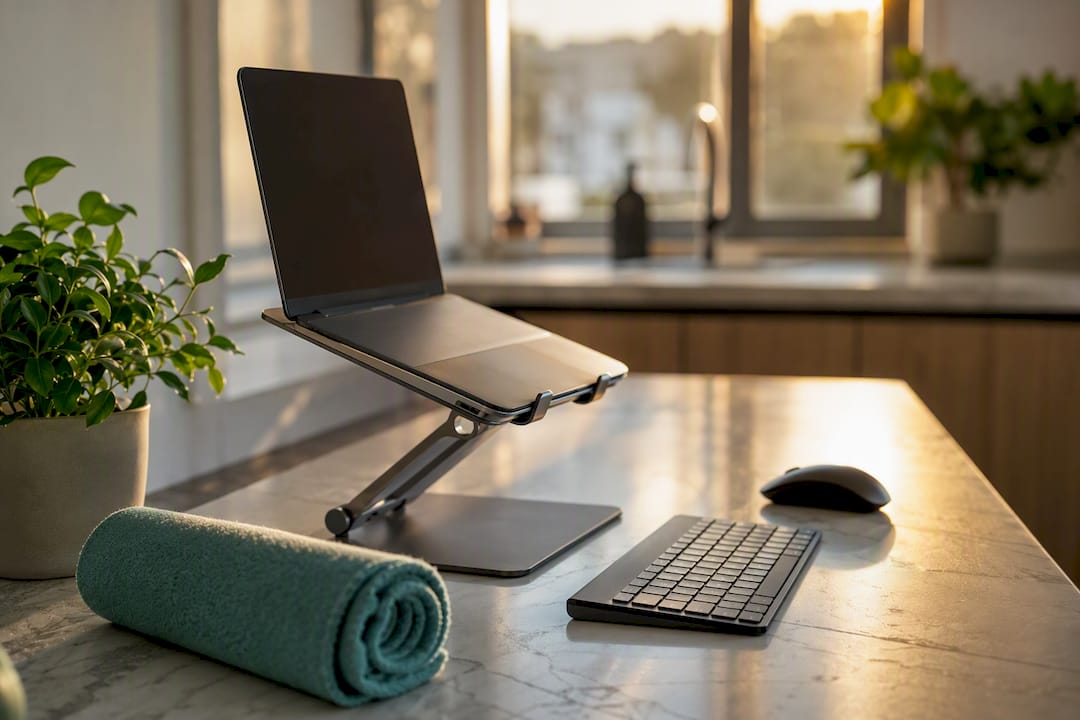
For equipment, you don’t need anything expensive. A portable laptop stand, a compact external keyboard and mouse, and a rolled towel for lumbar support cover the essentials whether you’re at a home desk, a coffee shop table, or a hotel room on a work trip. Test your setup with two quick checks: sit naturally and see if your elbows land near 90 degrees at the keyboard, and see if your eyes meet the 15 degree gaze rule without leaning forward. If either fails, the Spine-Health ergonomic checklist covers the adjustments in more detail. You can also read more on common sitting posture mistakes that quietly undo an otherwise good desk setup.
How Often Should You Take Breaks to Prevent Neck Pain From a Laptop?
Static posture is the real enemy, more than any single bad angle. Even a well-set-up desk causes strain if you never move from it, because clinical guidance consistently points to frequent short breaks as one of the most effective prevention habits for exactly this reason.
Try this rhythm:
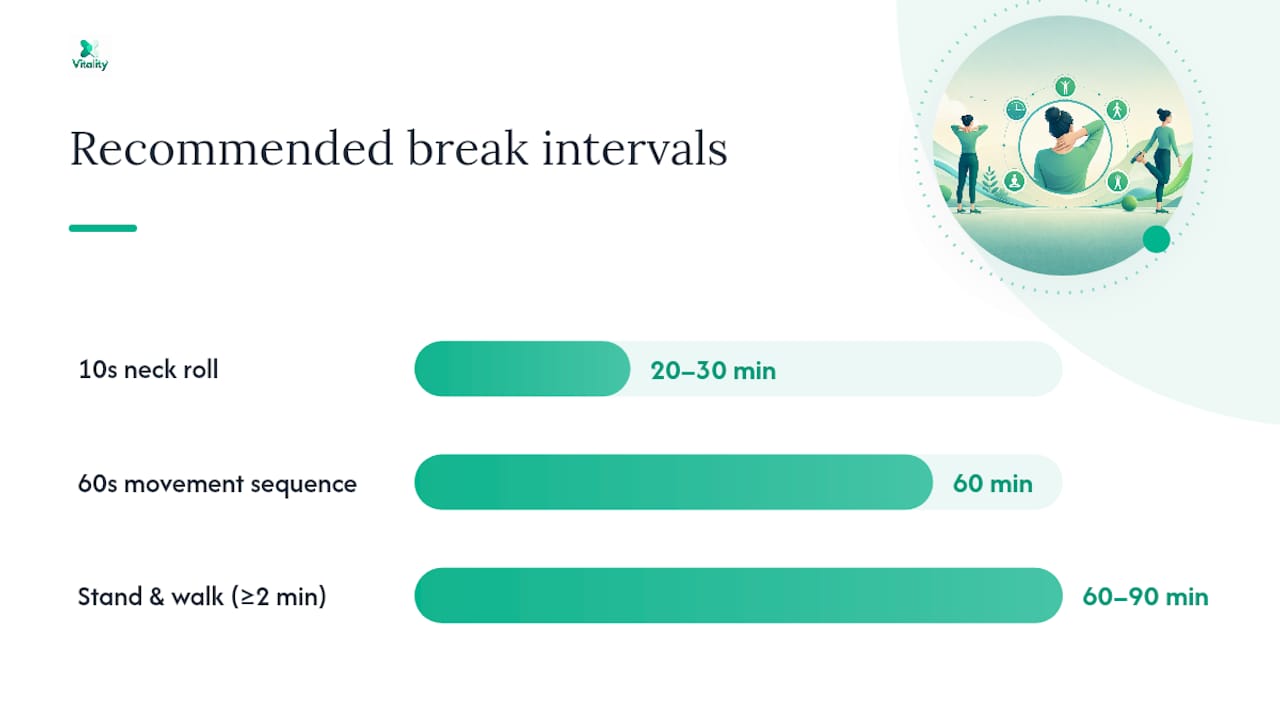
- Every 20 to 30 minutes, look away from the screen and do a 10 second neck roll.
- Every 60 to 90 minutes, stand up and walk for at least two minutes.
- Once an hour, run a 60 second sequence: shoulder shrugs, a chest opener, and a slow thoracic extension by arching gently over your chair back.
A phone timer or calendar nudge works better than memory alone. Audio-only calls are an easy built-in break window since you can pace or stretch without anyone noticing. Our work-hours neck checklist lays out a version you can keep pinned near your desk.
Which Exercises Actually Strengthen and Fix Laptop Neck Pain?

Stretching loosens tight muscles, but strength is what keeps your head from drifting forward again the next day. Building both into a short weekly routine gives you a program instead of just a one-off fix, and it lines up with what rehabilitation research shows: combined mobility work and progressive strengthening improve pain and function for many people with neck pain when done consistently.
Here’s a simple progression:
- Chin tucks (weeks 1 to 2): 2 sets of 10, held 3 seconds each, once or twice daily.
- Upper trapezius and levator stretch: tilt your head diagonally toward one armpit, hold 20 to 30 seconds, 2 sets per side.
- Thoracic extension over a chair back: sit tall, arch gently backward over the top of your chair, hold 5 seconds, 8 reps.
- Scapular retractions (weeks 2 to 4): squeeze shoulder blades together and hold 5 seconds, 3 sets of 10.
- Wall-supported neck isometrics (weeks 4 onward): press the back of your head gently into a wall for 5 seconds without moving your neck, 3 sets of 8.
Add a new exercise every one to two weeks rather than starting all five at once. By week 6 to 8, most people can hold the full sequence with noticeably less daily stiffness. Stop and scale back immediately if you feel sharp pain, pain that radiates down an arm, or new numbness. Those are signals to stop stretching and get it checked, not signals to push through.
Pro Tip: Pair scapular retractions with something you already do daily, like waiting for coffee to brew. Ten seconds of squeeze, three times a day, adds up faster than a scheduled workout you keep skipping.
For more depth on technique, our guide to stretching for stiffness relief walks through form cues for each stretch above.
Can Your Glasses Be Making Your Neck Pain Worse?
Vision and posture are more connected than most people realize. Progressive lenses have a narrow zone for computer distance, so wearers often tilt their head back or crane forward to find clear focus, and that habit becomes the very posture causing your pain. Physical therapists note that people will sacrifice spinal alignment for visual clarity almost every time, which means an ergonomic fix that ignores eyewear is only solving half the problem.
At your next eye exam, ask about:
- Computer-specific or “office” lenses with a wider intermediate zone.
- Anti-glare coating if screen glare makes you lean in.
- Whether your current prescription forces a head-tilt to find focus.
Can’t get new lenses immediately? Raise your screen closer to eye level, bump up the font size, and improve room lighting to cut glare in the meantime.
When Should You See a Doctor for Neck Pain From a Laptop?
Most tech neck responds well to two to six weeks of consistent self-care: ergonomic changes, movement breaks, and the stretching routine above. If you’re not improving in that window, it’s worth booking a physical therapist rather than waiting longer.
See a doctor sooner if you notice:
- Numbness or tingling spreading into your arm or hand.
- Progressive weakness in your grip or arm.
- Loss of bladder or bowel control (a rare but urgent emergency sign).
- Severe pain that doesn’t ease with rest or position changes.
If you do see a PT, bring photos of your workstation, a short symptom diary, and notes on what helps and what worsens the pain. That context saves an entire visit’s worth of guesswork.
Why Do Posture and Movement Actually Fix Neck Pain?
Forward head posture doesn’t just look bad. Every inch your head shifts forward multiplies the load your neck muscles and ligaments have to support, which is why holding that position for hours leaves you sore even without any single injury. Movement and targeted strengthening work because they restore the muscular balance and joint mobility that static posture erodes, giving the front and back of your neck a chance to share the load evenly again.
Most cases of tech neck are mild, respond to conservative treatment, and are largely preventable through posture correction and consistent habit change, according to Yale Medicine.
That’s the core reassurance worth holding onto: this usually isn’t a permanent injury. It’s a fixable pattern.
A publisher’s note on what actually holds up
We’ve reviewed the clinical guidance behind tech neck closely, and the pattern is consistent: people who combine ergonomic changes with daily movement improve faster than people who rely on stretching alone. The steps in this guide work when you do them consistently, not occasionally. For those wanting extra support at home or during travel, My Vitality’s devices are built to complement this same routine, not replace it.
A Simple At-Home Add-On for Days When Stretching Isn’t Enough
Some days, stretching and a better desk setup aren’t quite enough to quiet a stiff neck by evening. That’s where a supplemental device can help without replacing the habits above.
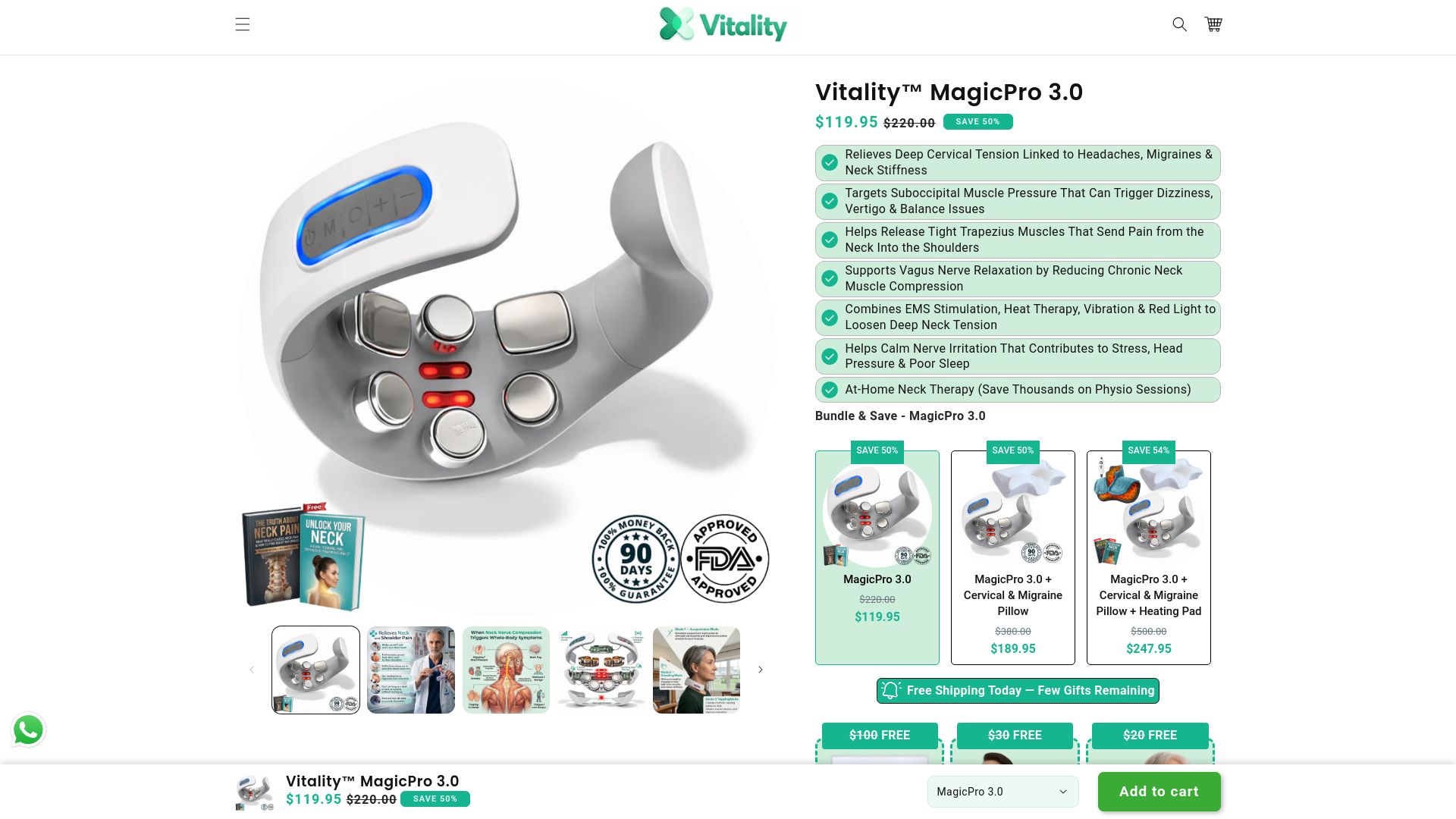
The Vitality MagicPro 2.0 combines heat, massage, and electrical muscle stimulation in a wearable unit you can use for about 15 minutes a day at your desk, on the couch, or between meetings. It’s built as an adjunct, something to run alongside the ergonomic fixes and exercises covered here, not a substitute for them. If your workstation is still causing strain, no device will out-perform fixing the setup itself.
Use it as directed, and stop if any discomfort worsens rather than pushing through. If you want a broader look at the full device lineup, including options for the lower back, browse the Vitality devices collection and see which fits your daily routine.
Frequently Asked Questions
What is the fastest fix for laptop neck pain? Raising your screen to eye level with a stand or stack of books, paired with an external keyboard, gives the quickest relief because it removes the forward head tilt causing the strain.
How long does it take to fix neck pain from laptop use? Most people see improvement within two to six weeks of consistent ergonomic changes and stretching. If symptoms persist past that window, a physical therapist visit is worth booking.
Can bad posture from a laptop cause permanent damage? Tech neck is usually a reversible, mechanical strain rather than permanent damage, and it typically responds well to conservative care like posture correction and targeted exercise.
Do I need an external keyboard if I use a laptop stand? Yes. Raising the screen without an external keyboard forces your wrists into an awkward angle while your shoulders hike up to reach the keys, trading one strain for another.
Can glasses really affect neck posture? Yes. Progressive lenses with a narrow computer zone often cause people to tilt their head to find clear focus, which can quietly reinforce forward head posture over time.
Sources
- Tech neck: Effect of technology - Mayo Clinic Health System
- What Is Tech Neck—and How Can You Prevent It? | Yale Medicine
- Tech Neck: 6 Exercises and Tips to Fix Neck Pain From Devices | Sutter Health
- PMC review article (relevant exercise/rehab research) | PMC